Every player’s minutes
Minutes played appear in every player’s profile and stats.
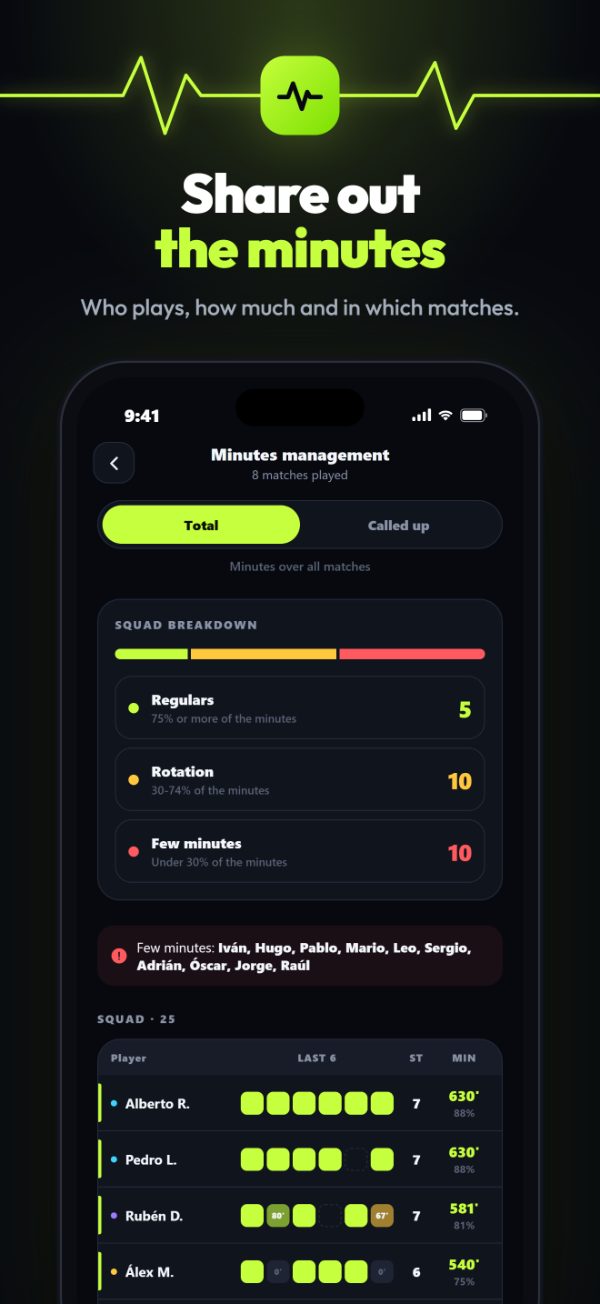
Team Vitals works out every player’s minutes from what you log in the match and warns you about who is short on them. Sharing out playing time is no longer down to memory.
In live mode or afterwards, you log goals, cards and subs.
With the starting line-up and the subs, it knows how long each player has played.
Minutes management flags whoever is short on minutes so you can take it into account.
Minutes played appear in every player’s profile and stats.
The whole squad with their minutes in every match, at a glance.
The app flags anyone below 30% of the possible minutes.
The minute runs on its own from kick-off and every sub is logged with its minute.
The suggested squad and line-up take into account how each player’s week went.
Compare the minutes and numbers of two players.
With the starting line-up and the subs you log, each with its minute. If a sub has no minute, the app makes an estimate.
Every player’s minutes in their stats, yes. Minutes management, with the warning about who plays little, is part of Team Vitals Pro and can be tried for free.
No. You can do it live from the touchline or afterwards, when you add the result.
It is already available for iPhone on the App Store. The Android version is coming very soon.
Now available for iPhone. Android coming soon.